Edit Your Videos 10x Faster with AI
You’re about to make a great video. Just record and talk. Our AI text-based editor got the rest. No heavy software, no messy timelines
Edit🎬 video




edit by text
Edit your video like
a document.
- Delete words in the transcript → the video cuts automatically
- Click any word to seek; select a range to act on it
- Word-level menu: highlight, retime, split, merge, edit, or delete
- Drop B-roll, GIFs, or stock footage at any word
- Export a selection as a standalone clip in one tap
- Every edit is reversible — unlimited undo / redo
So today I'm going to show you um,uhthe single best trick for going viral on short-form video.
ai editing suite
One-click edits that used
to take hours.
Toggle on the edits you want — captionrich does the rest. Every change is reversible.
Swipe to see more
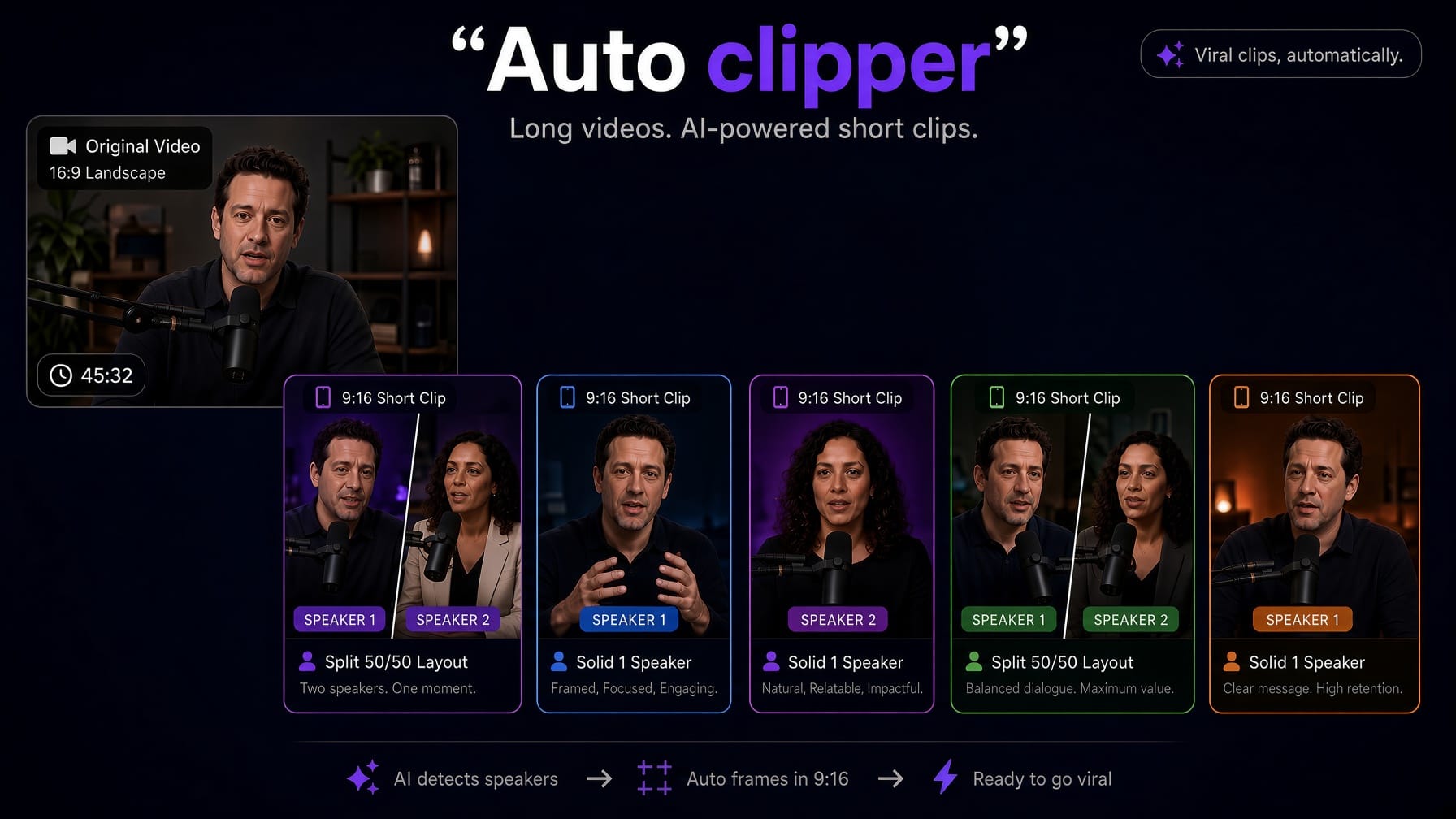
Auto Clipper
Turn a long podcast into short clips for TikTok, Reels, and Shorts.
Smart Scenes
AI splits your video into scenes by topic and pacing.
Remove Bad Takes
Detects false starts, flubs, and restarts — and cuts them.
Remove Silences
Auto-trim dead air to tighten your pacing.
Filler Words
Find and remove the ums, ahs, and likes.
Smart Jump Cuts
Tighten the gaps between sentences automatically.
Motion Graphics
AI-designed animated titles, stats, and callouts.
Scene Transitions
Fade, flash, slide, glitch, and whip pan.
Auto Emojis
Relevant emojis dropped onto your captions.
Auto B-Roll
Auto-insert matching stock footage on keyword moments.
waves crash on the ocean at sunset.
auto captions
Add trendy captions
in seconds.
Word-perfect, perfectly timed, animated to match the moment. Pick from dozens of viral-ready styles and post. No keyframing, no manual timing.
translate captions
One video.
50+ languages.
State-of-the-art AI translates your captions with meaning, tone, and style preserved — not literal word-for-word. One click, perfectly timed, ready to post worldwide.
“Don't miss this game-changer.”
Meaning, not literal
AI grasps context, tone, slang, and humor — translations sound natural, not robotic.
50+ languages
From Spanish to Japanese to Arabic, RTL scripts included — every language supported.
Timing stays perfect
Word-level timing is preserved on translation. Hit export — captions sync automatically.
how it works
Three steps. That's it.
Drop your video
Any format — MP4, MOV, WebM. Portrait or landscape. Short or long.
Style & edit
Pick from 40+ caption styles, then edit by text and flip on AI toggles — silence removal, bad takes, B-roll, zooms. Or just trust the defaults.
Export & post
Download your captioned MP4 ready to post on TikTok, Reels, Shorts — anywhere.
who it's for
Built for everyone who posts.
Whether you're growing a brand or making your first short, the workflow is the same — drop, style, ship.
Swipe to explore
questions
Everything you wanted to ask.
How do I add subtitles to a video with captionrich?
Upload your video, click once, and captionrich auto-generates accurate, word-level subtitles using state-of-the-art AI transcription. Pick from 40+ animated caption styles, edit any word if you need to, and export. The subtitles are burned into your exported video so they render the same on every social platform.
Is captionrich a free automatic subtitle generator?
Yes. The Free plan lets you generate automatic subtitles for 3 videos per month, up to 3 minutes each with no watermark. State-of-the-art transcription, 50+ languages, and 40+ animated styles are all included on Free.
How accurate is the AI transcription?
We use a state-of-the-art speech-to-text model — among the most accurate available, with up to 99% accuracy on clean audio. Most users never need to edit a single word. For heavy accents or code-switching, you can pin the language manually.
What AI editing tools does captionrich have?
A full AI editing suite, all one click each: Auto Clipper turns a long podcast or video into independent 9:16 shorts (Pro and Max Pro), Remove Silences trims dead air, Remove Bad Takes cuts false starts and flubs, Filler Words strips ums and ahs, Smart Jump Cuts tighten pacing, Smart Scenes splits your video into editable scenes, Scene Zoom and Scene Transitions add motion, Auto Emojis place emojis on your captions, and Auto B-Roll layers in matching stock footage. Every toggle is reversible.
What is text-based editing?
captionrich turns your video into editable text. Delete a sentence in the transcript and the video cuts to match, no timeline scrubbing. Select words to trim, copy, clip, or drop B-roll on top, and click any word to retime, highlight, split, merge, or restyle it. Editing video becomes as easy as editing a document.
Can I translate captions to other languages?
Yes. captionrich uses state-of-the-art AI to translate your captions into 50+ languages with one click. Preserving meaning, tone, and speaker style instead of literal word-for-word. Word-level timing is kept intact so the translated captions stay perfectly synced with your video.
Does captionrich work on mobile?
Yes, fully. captionrich is mobile-responsive end-to-end. Upload, transcribe, edit, translate, restyle, and export entirely from your phone or tablet — no app install required.
Ready to stop being boring?
Open the editor, upload, style, and export your first video in minutes.
Edit my video